SASSA & NSFAS Link Checker
Paste any web address, WhatsApp forward or SMS link below. The tool tells you in one second whether it is an official South African government site (SASSA, NSFAS, gov.za) or a link that matches a known scam pattern.
Nothing you paste leaves your browser. There is no sign-up, no tracking pixel on the check, and no fee. The rules below are what we use ourselves every time a reader forwards us a suspicious link.
Check a URL
https:// needed.What each verdict means
The tool sorts every URL into one of four buckets. Match the colour you see to what to do next.
The domain ends in a recognised government domain (.gov.za, plus nsfas.org.za). Safe to type into your browser and use for its stated purpose.
Still check for the padlock icon before typing your ID or a password.
No obvious scam signals, but the tool cannot confirm who runs it. Could be a small business, blog, or an unrelated service.
Do not enter your ID, cellphone number or bank PIN unless you already know and trust the operator.
One signal is off: no HTTPS, a suspicious top-level domain, or a look-alike name. Not necessarily a scam, but not a government site either.
Close the tab and retype the official address in your browser to be sure.
Two or more signals fire, or the link is a shortener that hides its real destination. Common phishing pattern.
Do not click through. Do not type anything. Report the link to SASSA and delete the message.
The eight official grant-related sites to memorise
Every legitimate SA government portal ends in .gov.za. NSFAS is the one common exception, ending in .org.za. If a "SASSA" URL does not end in .gov.za, it is not SASSA, no matter how professional the page looks.
srd.sassa.gov.zaR370 SRD application, status check, banking updates.www.sassa.gov.zaOlder persons, disability, child support and every other social grant.www.nsfas.org.zaStudent funding: applications, appeals, allowance payments.www.nyda.gov.zaYouth grant programme and business support.www.dha.gov.zaID applications, smart card bookings, birth and death registration.www.sars.gov.zaeFiling, tax returns, tax reference numbers.www.dsd.gov.zaPolicy, Livelihoods Grant framework, food-relief programmes.www.gov.zaGovernment Gazette, ministerial statements, national services index.The nine red flags this tool checks for
These are the URL-level patterns behind almost every SASSA / NSFAS scam we see forwarded on WhatsApp and Facebook. Each one is a rule the tool applies against the address you paste.
- Wrong domain ending
A URL contains "sassa", "srd" or "nsfas" but the domain does not end in
.gov.zaornsfas.org.za. Example:sassa-srd.co.za,srd-r370.online. This alone is a scam. - URL shorteners
Links that start with
bit.ly,tinyurl.com,ow.ly,t.co,cutt.lyand similar. SASSA and NSFAS never shorten their own links; the full address always fits. - Look-alike domain
A name crafted to read like a real service but with an extra word, hyphen or number:
sassa370.link,nsfas-payment.com,srd-status-check.co.za. - Suspicious top-level domain
Endings like
.link,.click,.xyz,.top,.online,.buzz,.tk,.gqaccount for the majority of SA phishing pages we see. - Raw IP address
A number like
http://196.24.10.11/applyinstead of a proper domain name. Real government services publish domains, not IPs. - Punycode / homograph
Foreign characters that look like Latin letters. Shows up in the address as
xn--at the start of a segment (e.g.xn--sass-c4a.gov.za). - HTTP instead of HTTPS
Missing the padlock. Real government portals encrypt every page. If the address starts with
http://and asks for your ID, walk away. - Deep or nested subdomains
Structures with five or more segments (e.g.
login.secure.sassa-portal.support.co.za) are sometimes used to disguise the real host after the last dot. - Unusual protocol
Anything other than
http://orhttps://, especiallydata:orjavascript:. Legitimate services never use these for a link.
Four scam patterns behind almost every SASSA / NSFAS phish in 2026
Reader forwards, SASSA fraud alerts and our own inbox tell the same story: four templates account for the vast majority of grant-related scams in South Africa this year.
The "SASSA portal" that isn't
A page mimicking the SASSA yellow-and-white design, on a domain like sassa-srd.co.za, sassa370.online or srd-r370-claim.link. Asks for ID, cellphone number and banking details "to verify".
.gov.za."Pay R25 to unlock your grant"
SMS or WhatsApp claiming SASSA needs a fee to reactivate a suspended grant, activate a Postbank Gold Card, or process a reapplication. Sometimes points to an EFT into a personal account.
"Livelihoods Grant pre-registration"
A WhatsApp forward with a shortened link asking for ID, phone number and banking details for the upcoming Livelihoods Grant. Regulations for that grant have not been gazetted; no pre-registration exists.
srd.sassa.gov.za and www.dsd.gov.za can host a real form."SRD fixer" WhatsApp groups
Groups or profiles offering to "unlock" your status, appeal on your behalf, or move your file to the top of the queue for a fee. Some ask for your SRD portal password or an SMS OTP.
Real fake SASSA sites we have seen
Two live scam pages we investigated. Both mimic the SASSA experience closely enough that a rushed reader will type an ID number without noticing. Here is exactly what to look at before you trust the page.
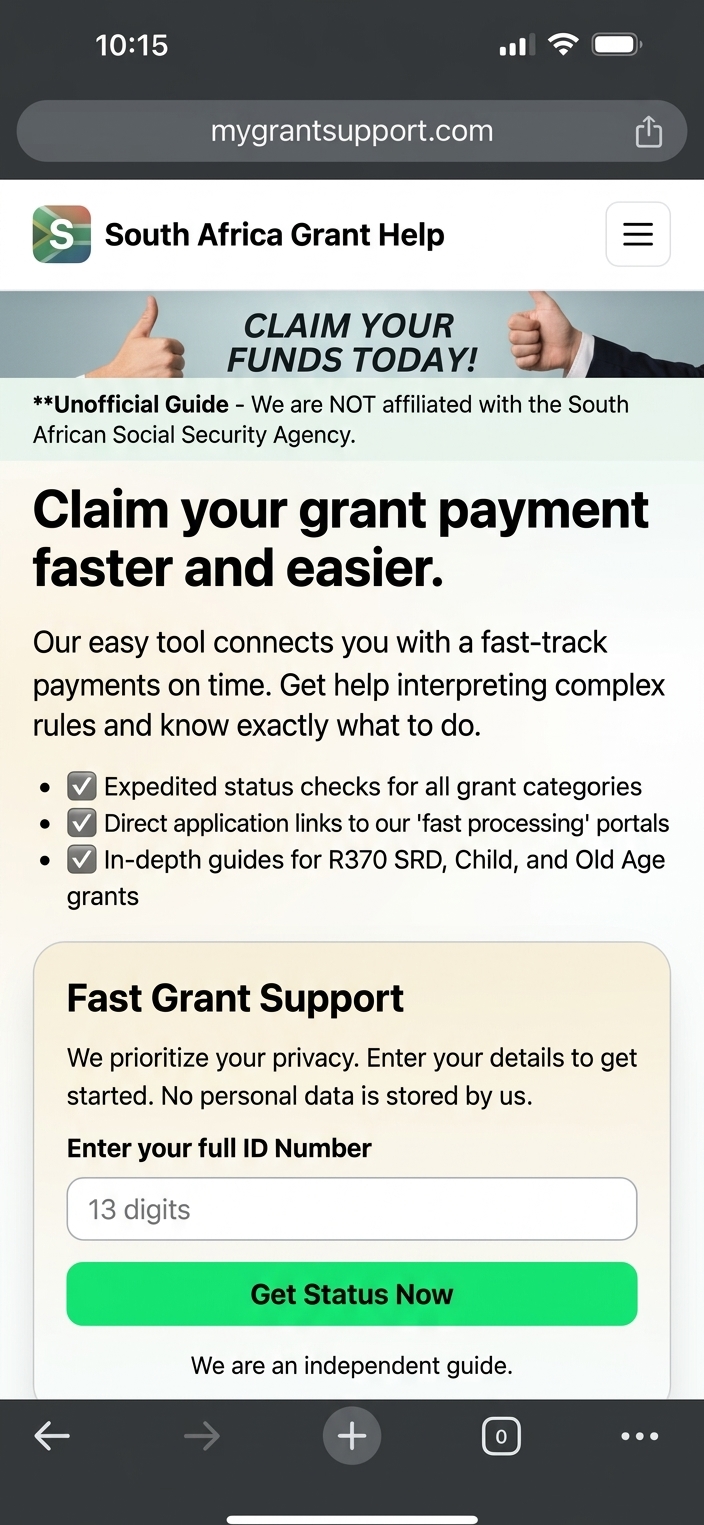
"South Africa Grant Help"
- Wrong domain ending. Ends in
.com. Every real SA government portal ends in.gov.za. - Own disclaimer betrays it. The header reads "Unofficial Guide, we are NOT affiliated with the South African Social Security Agency." A real SASSA page never needs that line.
- Vague copy, aggressive CTA. "Claim your grant payment faster and easier" plus a big green "Get Status Now" is designed to hurry you past the address bar.
- ID field on an untrusted domain. Once you type your 13 digits, the operator has an ID that can be sold or used for SIM swaps.
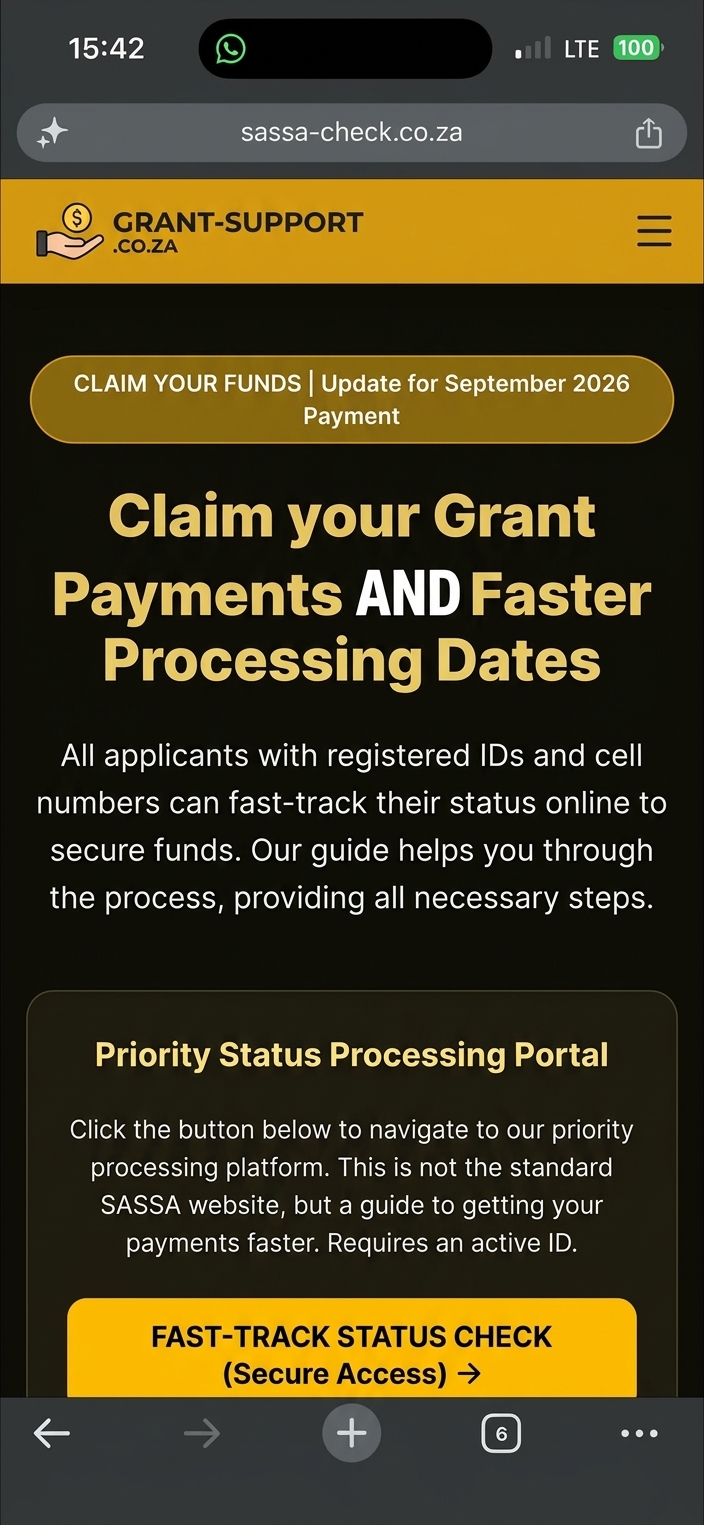
"GRANT-SUPPORT.CO.ZA"
- Look-alike domain. Uses
sassain the name but ends in.co.za, not.gov.za. Textbook "wrong ending" pattern. - Copied SASSA yellow. Matches the SASSA colour scheme to feel familiar. Design is not proof of authenticity.
- "Fast-track" language. SASSA has no fast-track. Every SRD application follows the same monthly means test; there is no premium queue.
- Buries the admission. One line hidden in the body reads "This is not the standard SASSA website", but the layout is designed to look official at first glance.
Paste either of these URLs into the checker at the top of the page. Both come back as Red: likely scam because they trigger the look-alike-domain and wrong-ending rules.
You already clicked and typed something. What now?
The panic reaction is understandable, but there is a clear order of operations. Follow these steps as soon as you realise the link was not legitimate.
- Stop typing. If the page is still open, close the tab. Do not enter anything else, even a "cancel" or "back" click on their form.
- Change any password you re-used. If the password you typed on the fake page is the same one you use for email, banking or WhatsApp, change it on those accounts now, from a different device where possible.
- Call your bank fraud line if you typed a PIN or OTP. Every South African bank has a 24-hour fraud number on the back of your card. They can freeze cards and block outgoing payments while you talk.
- Flag your ID at Home Affairs. If you typed your full ID number, visit www.dha.gov.za or your nearest Home Affairs office and ask for an ID misuse block, which prevents new accounts and SIM swaps against your name.
- Check your SRD status yourself. Log into the SASSA status check and confirm no application was submitted, no cellphone number was changed and no banking detail was updated in your name.
- Report the link and open a SAPS case. Forward the message to SASSA on [email protected] and call the fraud line 0800 701 701. If money left an account, open a case at your nearest SAPS station and keep the reference number.
Frequently asked
How do I know if a SASSA link is real?
.gov.za. The SRD portal is srd.sassa.gov.za and the main site is www.sassa.gov.za. Anything ending in .co.za, .com, .link, .xyz or a shortener like bit.ly is not SASSA, even if the URL contains the word SASSA or SRD.Does SASSA send SRD links via WhatsApp or SMS?
srd.sassa.gov.za, on the SASSA WhatsApp bot at 082 601 0111, or through the toll-free helpline 0800 60 10 11. Any WhatsApp forward or SMS with a shortened link claiming to check status or unlock money is a scam.I already typed my ID into a fake SASSA site. What now?
Is grantza.org.za an official SASSA website?
srd.sassa.gov.za for SRD, www.nsfas.org.za for NSFAS.Does this tool see or store the links I check?
Why do scam links look so convincing?
sassa-srd.co.za instead of srd.sassa.gov.za). Once the page loads, the browser cannot tell you who owns it, so the check has to happen at the URL level. That is what this tool does.Can I use this checker for links that are not SASSA?
Report a scam link to SASSA
Every reported link helps SASSA and its fraud unit tighten the net. Forward the message with the link intact; they need it to trace the operator.
Editor, grantZA · SRD, security & scam-pattern coverage