SASSA Status Check SRD R370 payment dates & status
About this tool · Privacy · POPIA
Operated by SNEGO GROUP (Pty) Ltd
SRD status check on the official portal
Run your R370 SRD status check directly on the official SASSA SRD portal (srd.sassa.gov.za). You will need the same 13-digit ID number and cellphone number you registered with your SRD grant application.
Check on sassa.gov.zaOpens srd.sassa.gov.za in a new tab. Have your ID and SASSA-registered cellphone number ready before you click through.
How to check your SRD status
- Scroll to the SASSA Status Check form at the top of this page. It has two fields: ID number and phone number.
- Enter the 13-digit South African ID number of the SRD applicant.
- Enter the 10-digit cellphone number registered with SASSA for that application.
- Press Check Status. You will be taken to the status results page with the outcome for each recent payment month.
Tip: on the results page, tap any month marked declined or pending to open the resource that explains what to do next.
October 2026 SRD payment dates
The October 2026 SRD R370 pay dates below (22 and 23 October) come from approved applications we have observed landing through our own SASSA status checker in the past few days. SASSA has not yet published the official October poster on its Facebook page. We will mirror the official poster here within 24 hours of SASSA posting it, and update the dates above if the official announcement differs.
Refreshed each month: this block is rewritten every month with the new SASSA-confirmed dates, the poster for that month, and the source link to the SASSA Facebook post announcing it. Information is coming soon for October 2026.
Dates confirmed by observing approved applications on our SASSA status checker.
Source: we check SASSA on Facebook every morning. The source link for October 2026 will be added here once the pay-dates post goes live.
September 2026 SRD payment dates
SASSA has confirmed the September 2026 SRD R370 pay run on its official Facebook page. Payments run on 23 September 2026 and 25 September 2026. Wednesday 24 September is Heritage Day, a public holiday, and no SRD batches process that day.
Refreshed each month: this block is rewritten every month with the new SASSA-confirmed dates, the poster for that month, and the source link to the SASSA Facebook post announcing it. Check back at the start of October 2026 for the next pay run.
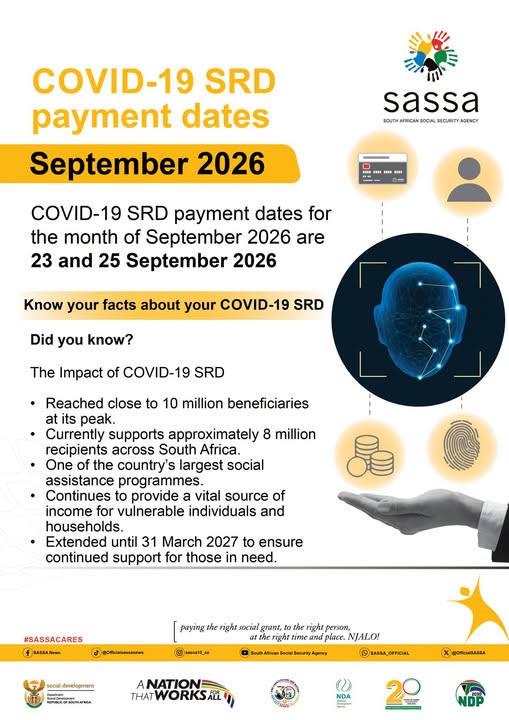
Source: official SASSA Facebook post published 22 September 2026 at 09:21 SAST.
SASSA SRD R370 payment dates 2026: full month-by-month schedule
Every SASSA COVID-19 SRD R370 payment window for 2026, from January through the current September pay run, with October, November and December still to be released. SASSA usually publishes each month's SRD pay run in the week before payments start, so confirm the current month's dates through the official srd.sassa.gov.za portal or SASSA's Facebook page before you plan around it. Use this table to see when past R370 payments cleared, which day of the month SRD money typically lands, and how the pay-day rotation lines up with the older-person, disability and child grants further down the page.
| Month | Payment window | Status |
|---|---|---|
| January 2026 | 23 to 28 January | Paid |
| February 2026 | 20 to 25 February | Paid |
| March 2026 | Not publicly announced | No schedule |
| April 2026 | 23 to 24 and 29 to 30 April | Paid |
| May 2026 | 21 to 22 and 27 to 28 May | Paid |
| June 2026 | 24 to 25 June | Paid |
| July 2026 | 23 to 24 July | Paid |
| August 2026 | 24 to 26 August | Paid |
| September 2026 | 23 & 25 September (24 Sep is Heritage Day, no payments) | Previous pay run |
| October 2026 | Not released yet | Upcoming |
| November 2026 | Not released yet | Upcoming |
| December 2026 | Not released yet | Upcoming |
Sources: verified against the official SASSA and Department of Social Development Facebook pages. No other sources.
SASSA annual payment schedule for Older Persons, Disability and Children's grants, financial year 2026 / 2027
The SRD R370 is not the only grant SASSA pays out each month. If you or a family member receives the Older Person's grant, the Disability grant, or a Children's grant (Child Support, Foster Child, Care Dependency or Grant-in-Aid), SASSA has already published the full 12-month pay-day calendar for the 2026 / 2027 financial year. The three grants pay on three separate days each month (older persons first, then disability, then children's grants), with a fourth day set aside for exceptions and payments that missed the first release.
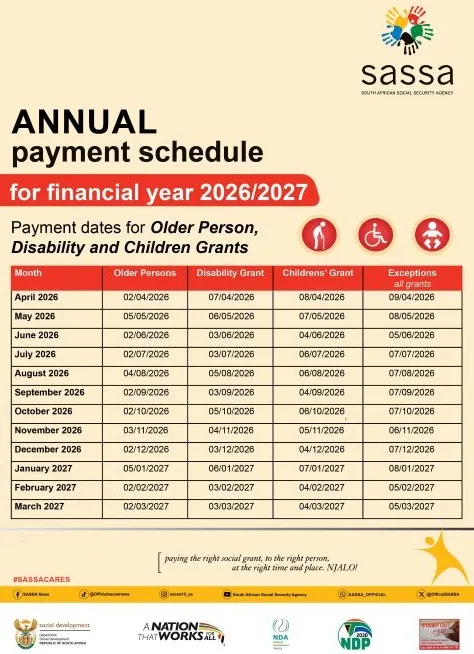
How to read the SASSA pay-day rotation
SASSA staggers pay days so ATMs, retailers and Postbank counters are not flooded on the same morning. The rotation is the same every month, as set out in the official SASSA 2026 / 2027 annual payment schedule published by SASSA News (Facebook): Older Person's grant pays on the first working day, the Disability grant on the second, and the Children's grants on the third. The Exceptions day is used for payments that failed the first attempt, for beneficiaries who cashed out late in the previous month, and for accounts flagged for a re-run.
Once your grant lands in the account it stays there until you draw it, so you do not have to withdraw on the exact pay day. If you can wait a few days, ATM queues thin out sharply from about the fourth working day of each month.
What to do if your grant does not pay on the scheduled day
Older Person's, Disability and Children's grants do not need a monthly reapplication, so on a normal month there is nothing to check. Only act if the money has not reflected in your account or Postbank card 48 hours after the scheduled pay day above. When that happens, work through the Payment Not Received checklist first, then call SASSA on 0800 60 10 11 to open a manual payment trace if the checklist does not resolve it.
Sources: the pay-day poster above was published by SASSA and the Department of Social Development for the 2026 / 2027 financial year.
Official ways to check your SASSA SRD status in 2026
Below are the official SASSA channels for an R370 SRD status check, each one run by us in September 2026 with the real screens captured. The portal and WhatsApp cards include a tap-through walkthrough of every screen you will see. GovChat is listed only so you know it no longer offers an SRD option. Use the picker to jump to the channel that fits your situation.
| Channel | Median reply | Needs data | Reason code | Pay date | Works if number changed |
|---|---|---|---|---|---|
| SRD portal | 4s off-peak · 6 min peak | Yes | Full | Yes | No |
| WhatsApp bot | 3 to 4 min (OTP wait) | Yes, low | One-line reason | Yes (menu 3) | No, OTP goes to old number |
| USSD *134*7737# | Not working | Service code not supported | - | - | - |
| GovChat | No SRD option | Health alerts only | - | - | - |
| Helpline call | 4 to 12 min hold | No | Full & explained | Yes | With ID verify |
| SASSA office | 1 to 3 hour queue | No | Full & explained | Yes | Yes, can update |
Response times are from our own repeated checks across September 2026. Peak means the 18th to 26th payment window when portal traffic is heaviest; off-peak means the rest of the month.
1. Official SRD portal (srd.sassa.gov.za)
Go straight to the status form at srd.sassa.gov.za/sc19/status. Two fields, one submit button, and the result loads on the same page underneath. Tap through the two screens below.
1. Fill in the two fields
Your 13-digit ID and the 10-digit cellphone number you applied with. The counters under each box (13 of 13, 10 of 10) confirm the length before you tap submit.
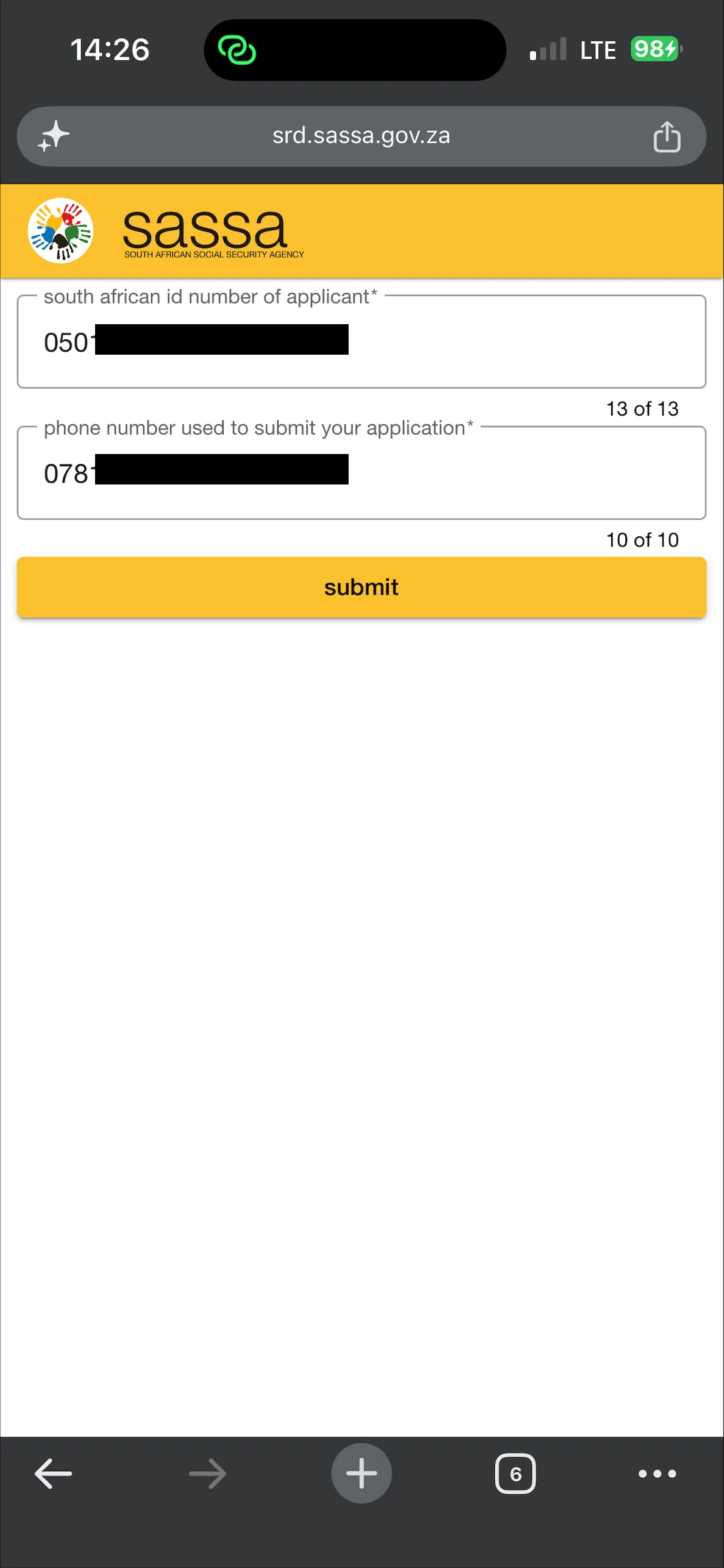 Captured 20 Sep 2026, srd.sassa.gov.za portal, Chrome on iPhone.
2. Read the result under the form
An "Application complete" panel shows your application id and post office choice. Below it, one panel per month (for example SEP2026) gives the outcome and the reason in plain words, such as "declined, means income source identified".
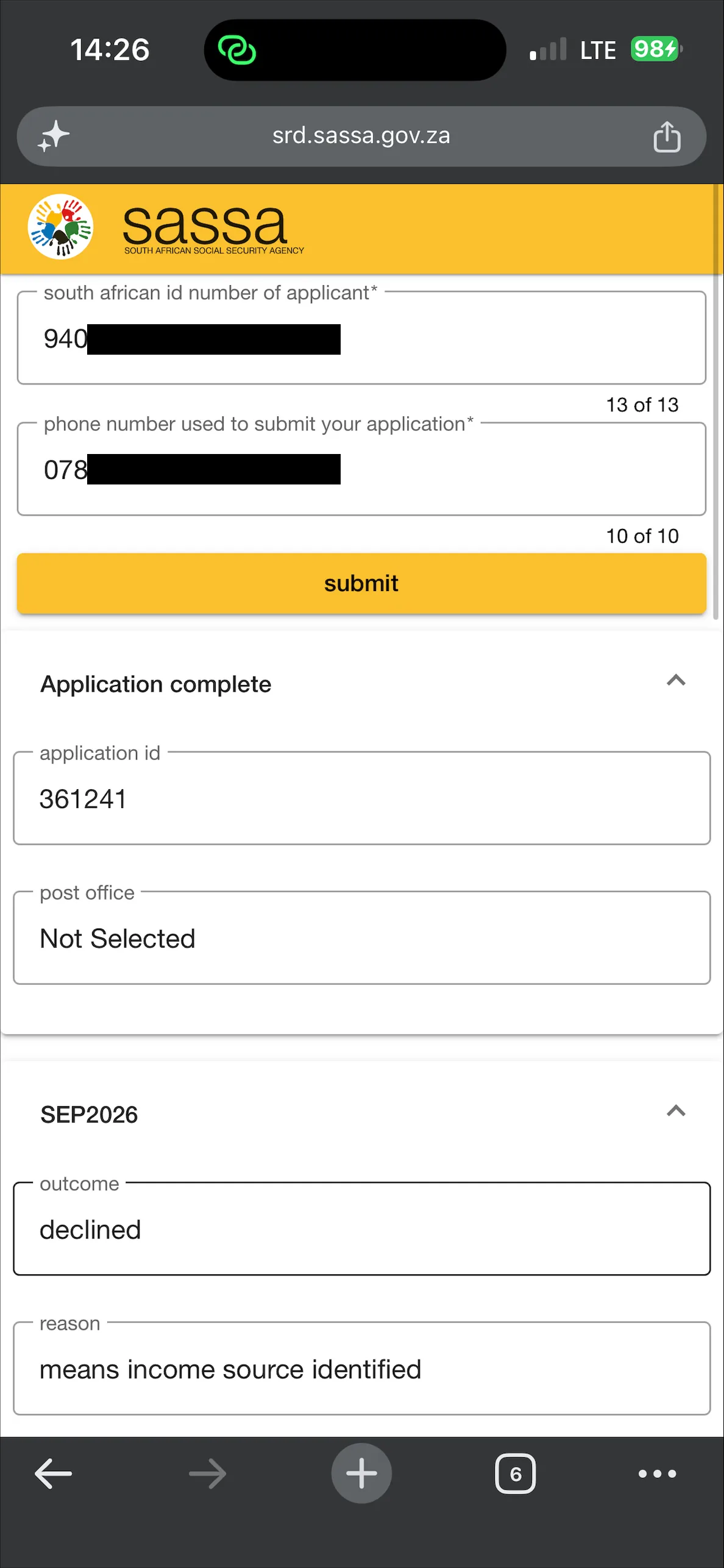 Captured 20 Sep 2026, srd.sassa.gov.za result panel, Chrome on iPhone.
Only the portal shows: your application id and the post office field. If the post office reads "Not Selected" and you expect a cash collection, that is why nothing is waiting for you.
2. WhatsApp bot (082 601 0111)
The line answers as "Sassa Status" with a blue verified tick. It is menu driven, not keyword driven: you tap options and the bot walks you through, and it needs an OTP before it shows anything. Tap through the four screens below.
1. Open the SRD service and prove it is you
Send Hi, tap Main Menu, choose My COVID19 SRD. The bot asks for the cellphone number you applied with, then for an OTP, then for your 13-digit ID. Once all three are in, the five-option menu appears.
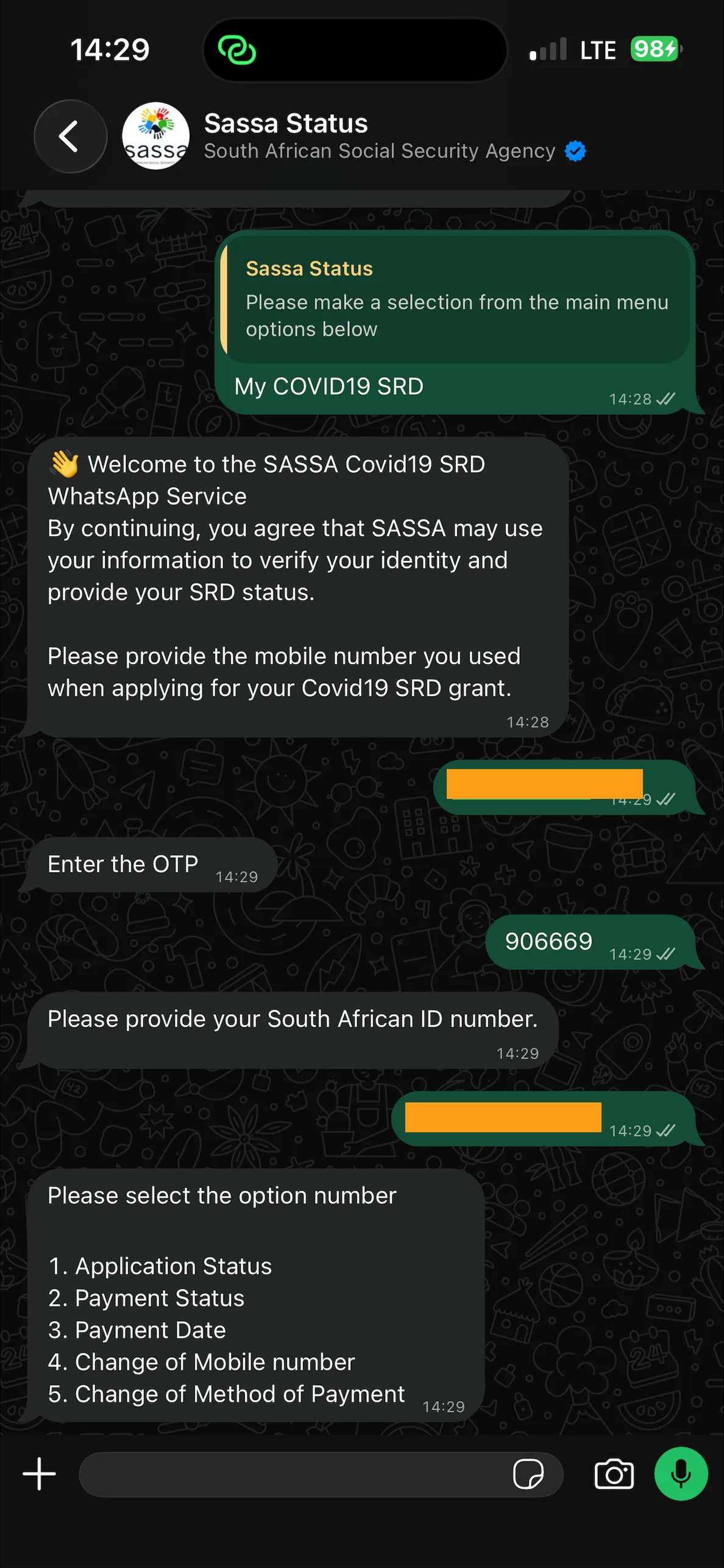 Captured 20 Sep 2026, MTN network, WhatsApp 082 601 0111 verified account.
2. The OTP arrives by SMS, not in WhatsApp
Check your text messages. It comes from a long unfamiliar number (ours arrived from +27 8391 902 7315 120), not from a saved SASSA contact, and reads "SASSA OTP Code is" followed by six digits. That is normal. Type the six digits back into the WhatsApp chat.
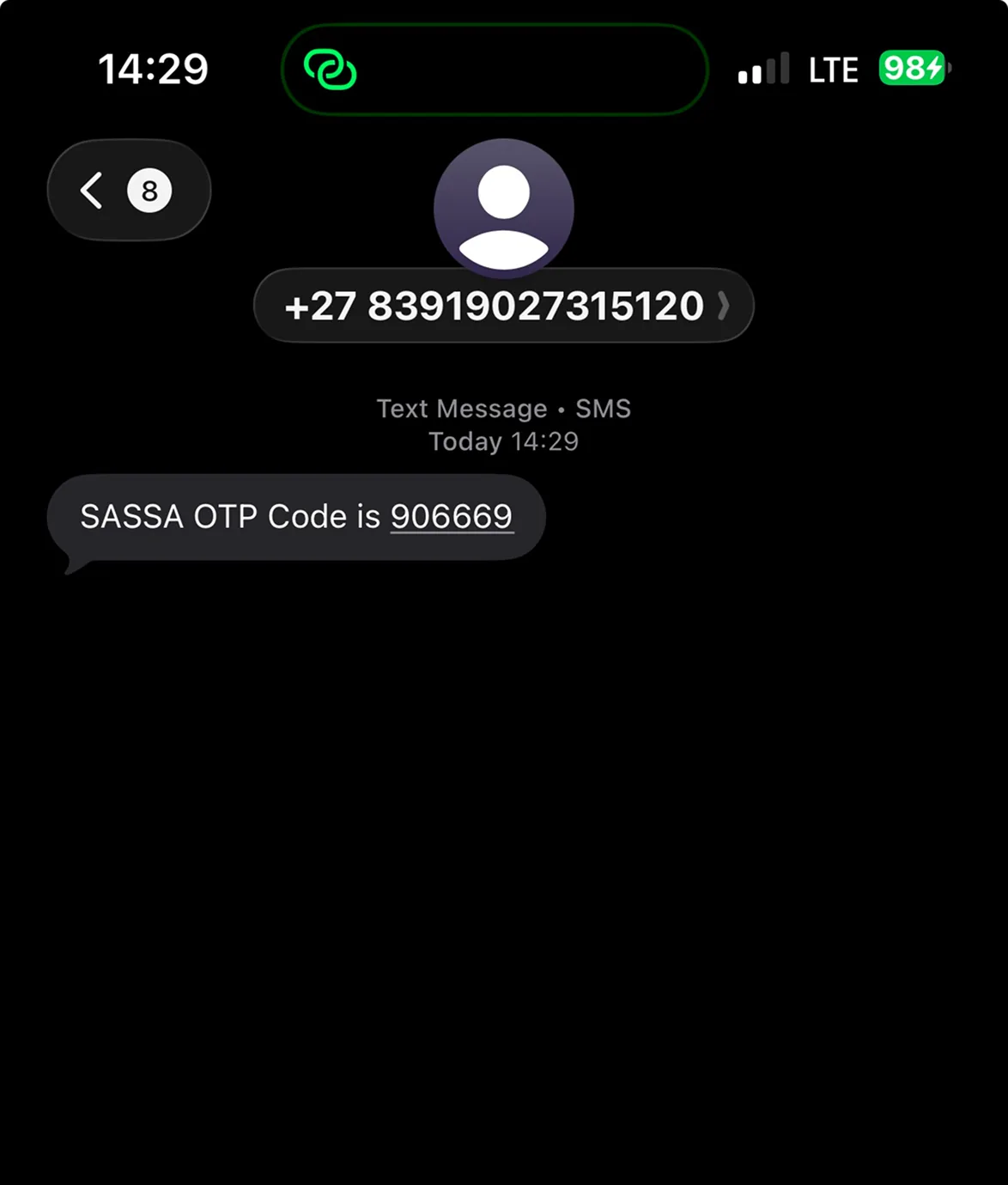 Captured 20 Sep 2026, MTN network, incoming SASSA OTP SMS on iPhone.
3. Pick what you want to see
Reply 1 for Application Status, 2 for Payment Status, 3 for Payment Date, 4 to change your cellphone number, 5 to change your payment method. Option 1 only confirms the application went through ("Application is Completed"); it does not give the monthly outcome. For that reply 2, then tap Choose Year and Choose Range (January to June, or July to December).
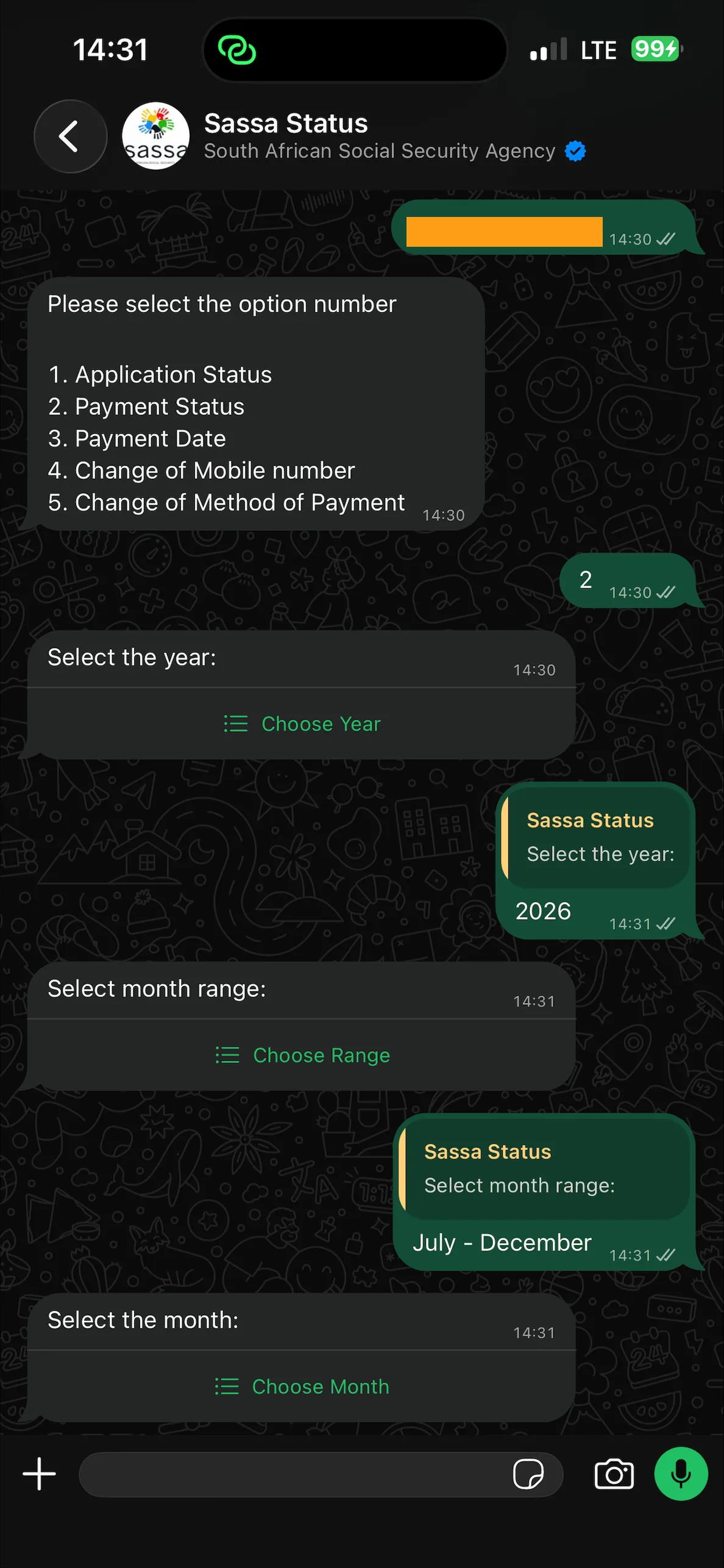 Captured 20 Sep 2026, MTN network, WhatsApp 082 601 0111 payment-status menu.
4. Read the result
Tap Choose Month. The bot replies with the outcome and reason in one line, for example "Declined: Another income source was identified." It then offers Continue with SRD, Go to the Main Menu, or Cancel. Continue with SRD asks for a fresh OTP every time, so keep your phone close if you want to check more than one month.
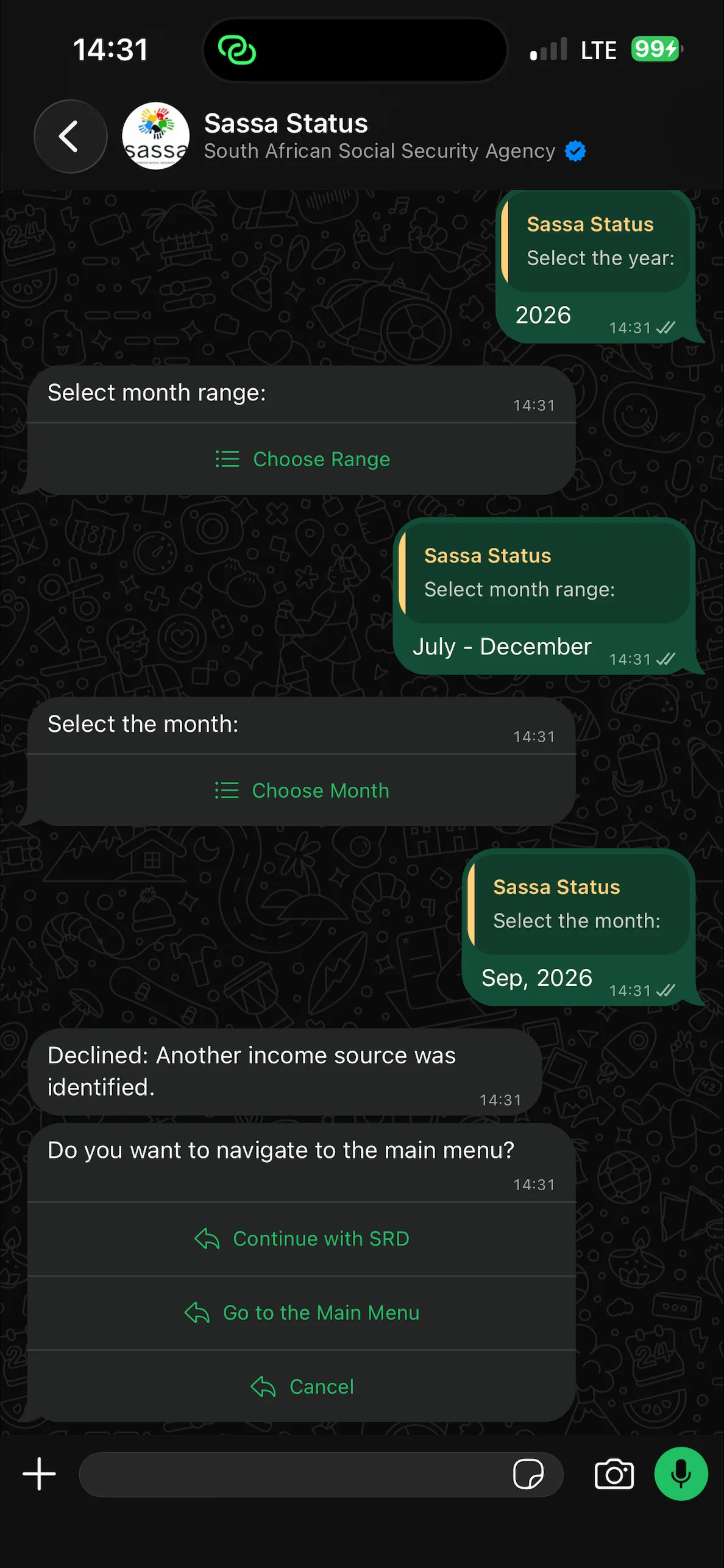 Captured 20 Sep 2026, MTN network, WhatsApp 082 601 0111 declined result.
Watch out: only 082 601 0111 is official. The OTP only ever comes by SMS to the number you applied with. Anyone asking you to send the OTP somewhere else, pay a fee, or share a bank PIN is not SASSA.
Both SRD USSD codes SASSA has published, *134*7737# and the older *120*69277#, currently return a "Service code not supported" message when dialled. We tested them on all three major South African networks (MTN, Vodacom and Cell C) in September 2026 and got the same error on each one. The keystrokes below are kept for reference; use the WhatsApp bot, portal or helpline instead until SASSA reactivates the USSD service.
Historical USSD keystrokes (for when the service returns)
- Dial
*134*7737#. - Reply
1for SRD. - Reply
1for status. - Type your 13-digit ID, press send.
In the meantime: the SASSA SRD WhatsApp bot on 082 601 0111 is the closest data-light equivalent while USSD is down.
GovChat no longer checks SRD. In September 2026 the line answers as Contact NDoH, the National Department of Health, and pushes you to sign up for health alerts before showing a menu. That menu is News & updates, Helplines, Your profile, Privacy Policy, TB, Measles, COVID-19 and HIV prevention. There is no Services, SASSA or SRD entry, and typing SRD gets no reply.
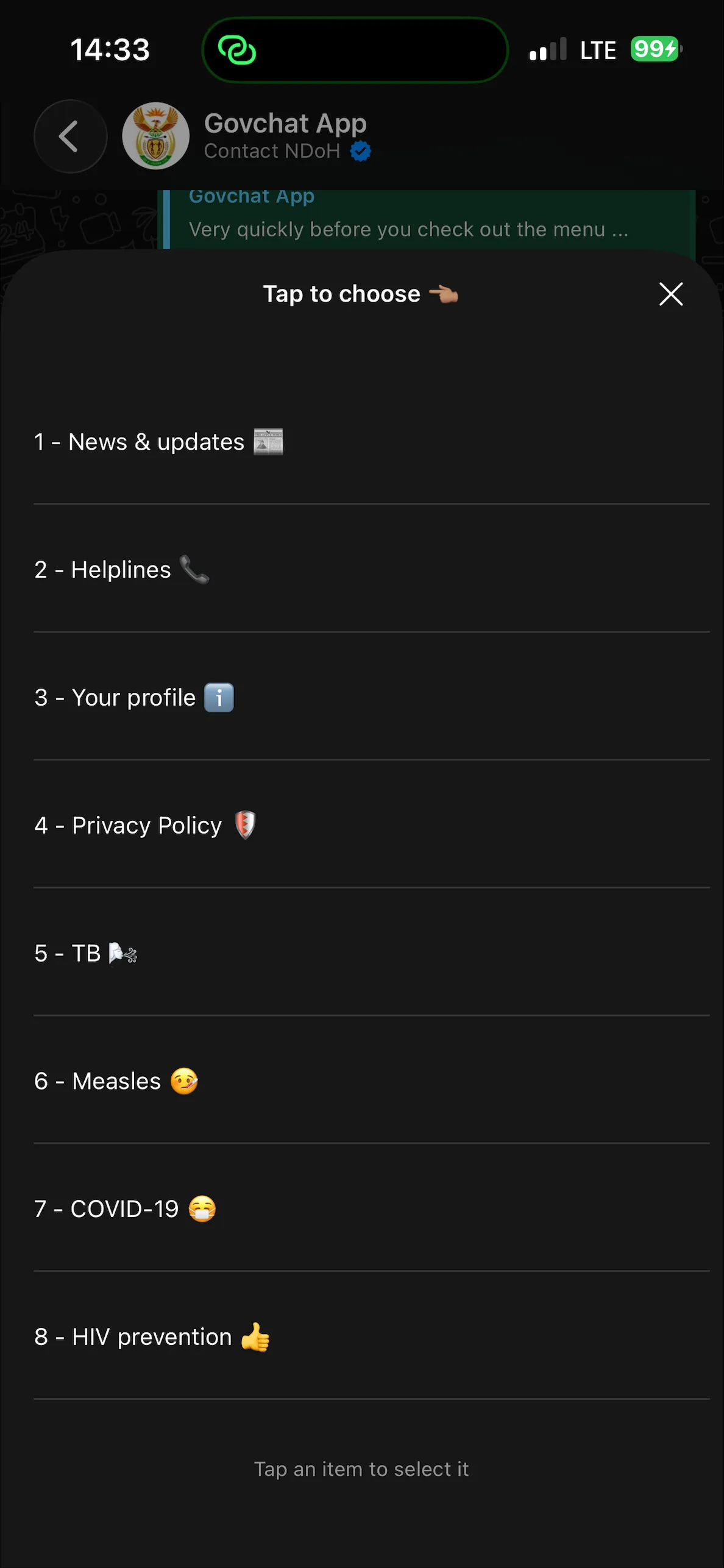 Captured 20 Sep 2026, Vodacom network, Govchat WhatsApp bot Main Menu.
Why it still matters: older guides and forwarded messages still tell people to "check SRD on GovChat". Any link or post that does is out of date at best and a scam at worst. Use the WhatsApp line above or the portal instead.
5. Helpline (0800 60 10 11)
The one channel where a human explains a reason code out loud. From our own calls, hold times run longest during the 18th to 26th payment window and after-work hours, and shortest on weekday mornings outside that window.
IVR shortcut most callers miss
Once the menu starts, press 1 for English » 2 for SRD » 3 to skip the recorded FAQ and go straight to an agent queue.
Best for: Declined statuses where you want the reason and the appeal steps explained.
6. SASSA office visit
The only channel that unlocks records tied to a dead cellphone number, a lost ID, or a biometric mismatch. Everything else needs your registered number to work.
Bring exactly this checklist
- Green ID book or Smart ID card, plus one photocopy.
- Proof of residence not older than 3 months.
- Old and new cellphone number (SIM if possible).
- Bank confirmation letter if the account has changed.
Timing tip: queues are shortest on the last week of the month and Wednesday mornings. Avoid the first three days after payday.
What does your SRD status mean?
Pick the outcome you saw on the portal and we will explain what it means and what to do next.
Your status looks wrong? Email SASSA
If your outcome above does not match your situation (for example you are Declined for Alternative Income Source when your bank account is empty, or your status has been Pending for over a month), the escalation route SASSA itself directs beneficiaries to is email. Write to [email protected] and include your ID number, the month in question, and a screenshot of the status result.
SRD R370 Status Query - [ID] - [Month]. A single-purpose subject line makes it easier for the SASSA inbox team to route your query correctly.Heads up: email replies are slow and sometimes never come. The SRD inbox handles a very high volume, so responses are unpredictable. Many beneficiaries wait weeks; some report never getting a reply at all. Send the email for the paper trail, but if you need an answer soon try WhatsApp 082 601 0111 or the helpline 0800 60 10 11 in parallel.
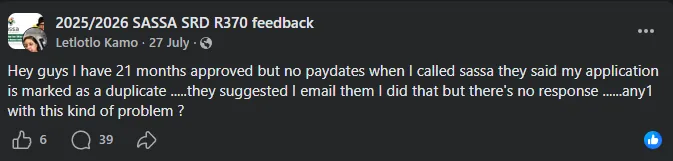
Heads-up: the SASSA SRD USSD codes are not working right now
Both USSD codes SASSA has published for the SRD grant, *134*7737# and the older *120*69277#, currently return a "Service code not supported" message when dialled. We tested them on all three major South African networks in September 2026, MTN, Vodacom and Cell C, and got the same error on each one.
Until SASSA reactivates the USSD service, use one of these instead:
- WhatsApp bot 082 601 0111 - the closest data-light replacement.
- Toll-free helpline 0800 60 10 11 for a live agent.
- Official portal srd.sassa.gov.za when you have data.
We are keeping the historical USSD codes on the page for reference so you know which numbers to try again once the service is restored.
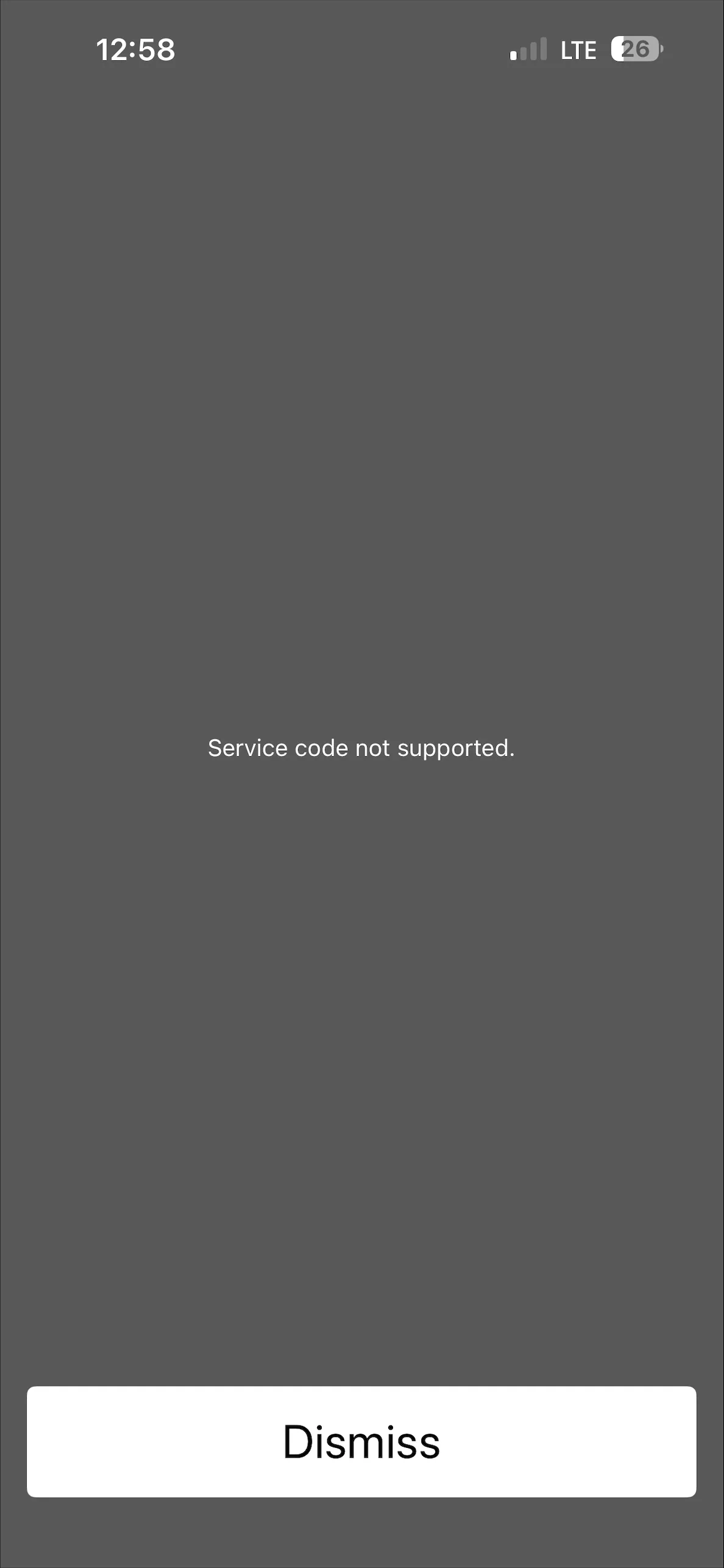
Best time to check your SRD status
From our own use of srd.sassa.gov.za and the WhatsApp line each month, the portal is noticeably slower during one predictable stretch: the 18th to the 26th of every month. That is the SRD payment window and everyone opens the portal at once, so the system is prone to the "too many requests" overload for stretches at a time. Outside that window it usually loads in a few seconds. The card layout below is what we plan around, not a SASSA-published schedule.
These windows are based on our own observation while running status checks each month, not a schedule SASSA publishes. If the portal is slow, the WhatsApp line on 082 601 0111 usually still answers.
Scam watch: three patterns active this month
The August portal outage and the Livelihoods Grant switch have both triggered fresh scam waves. If you see any of these, do not engage, and if a link looks unfamiliar drop it into the Website Legit Checker before you type any of your details.
Report SRD scams to [email protected] or the toll-free line on 0800 60 10 11.
Latest SRD news
Latest SRD grant news, portal updates, and appeal guides from the grantZA news feed.

Status check resources & next steps
Every SRD outcome, common blocker, and appeal step explained in one place.
SRD status check FAQ: the questions we get asked most
Answers to the questions readers send us most often about the SASSA SRD R370 grant. Each answer draws on the September 2026 rules and the current state of the SRD portal.
Can I check someone else's SASSA SRD status with their ID and cellphone number? +
Technically yes, because the SASSA SRD status check on any official channel only asks for the 13-digit ID and the registered cellphone number, both of which the applicant already gave SASSA. Doing it on someone's behalf with their explicit consent, for example an older relative you help with the portal, is standard practice. Doing it without their consent is a POPIA violation and, if you also change their bank details or claim their payment, criminal fraud under section 21 of the Social Assistance Act. Ask before you check.
My SRD status says Approved but no money has arrived. What now? +
Approved means SASSA has cleared the payment for the month; it does not mean the money has moved yet. The pay run only starts on the published SRD payment date for that month and the last batch usually clears within seven working days of that. Three things typically delay it after Approved:
- Bank verification failure. The account name on your bank record does not exactly match your ID. Update your bank details on srd.sassa.gov.za.
- Dormant or closed account. A savings account with no activity for 90+ days gets rejected. Reopen it or switch to a Postbank account.
- Postbank switch pending. If you are still on the old Gold card, the payment queues until you swap.
If the payment date has passed by more than 7 working days, call 0800 60 10 11 and ask for a payment trace.
Do I have to reapply for the R370 SRD grant every month? +
No. Once your original SRD application is approved, SASSA re-tests eligibility against the R624 means test (SASSA means test leaflet) each month against SARS, UIF and bank-account records without needing a new application from you. In practice you still have to reconfirm your personal details every three months on the SRD portal, and update your banking or cellphone details within seven days of any change, or the monthly re-test can fail. Only submit a new application if your existing one is formally Cancelled or Rejected, never while a decision is Pending.
What counts as income for the R624 SRD means test? +
Any money that hits your bank account (or that SARS/UIF have on record for you) in the tested month counts unless you can prove it is not income. In practice SASSA counts:
- Salary or wages reported to SARS by an employer
- UIF payouts
- Freelance or side-hustle income deposited to a bank account
- Recurring bank deposits of R624 or more from the same source
Deposits that usually should not count if you dispute them properly:
- A once-off gift or loan from family (submit an affidavit + bank statement)
- Refunds from a store or medical aid
- Money you moved between your own accounts
Can I get the SRD grant if I already receive another SASSA grant? +
Not for yourself. The R370 SRD is intended for South Africans who receive no other SASSA grant. If your ID is already on file as the primary beneficiary of an Older Person's, Disability, Child Support, Care Dependency, Foster Child or War Veteran grant, your SRD application will be automatically declined with the reason "Alternative Income Source Identified".
The exception is Child Support: the money is paid to the child's caregiver, not to the child, so an adult applying for SRD while also receiving Child Support on behalf of a child in their care is still eligible. SASSA occasionally flags this incorrectly; if you are in that position and declined, lodge a reconsideration and include the Child Support award letter.
What time of day does the SRD status update, and how often? +
SASSA has not published the SRD backend schedule. What we see in our own repeated portal checks each month is that srd.sassa.gov.za, the WhatsApp bot and the helpline read from the same database and refresh together, so if one channel updates, the others do too. In practice this tends to mean:
- Fresh applications: a first status normally appears in the mid-month window after SASSA's income cross-check runs. If you have submitted this month and nothing shows yet, check back after the 20th.
- Existing beneficiaries: the monthly re-test outcome is usually visible on the first business day after month-end.
- Reconsiderations: in our tracking, outcomes typically land within 60 to 90 days and replace the disputed month's status with Approved or Declined.
How do I know if someone has fraudulently claimed SRD in my name? +
Run a status check on srd.sassa.gov.za with your ID number even if you never applied. If the portal shows an active application, a payment history or a cellphone number that is not yours, someone has fraudulently registered SRD under your ID. Common warning signs:
- A status result appears for you even though you never applied
- The registered cellphone number is not one of yours
- The linked bank account does not belong to you
- Random SMSes from SASSA about a grant you did not apply for
Report the fraud immediately: email [email protected] with your ID and a description of the fraud, call the SASSA toll-free line 0800 60 10 11, and open a case at your nearest SAPS station. Flag the ID at Home Affairs as well to block further misuse.

Neo Hlapho has written about the SASSA Social Relief of Distress (SRD) grant since 2021 across grantZA and sassa-status.co.za. His monthly review of the SRD pay run, reconsideration outcomes, and the ongoing Postbank Gold card migration is the source of every payment window shown above.
How we verify SRD payment dates each month
- We watch the official SASSA News (Facebook) and Department of Social Development pages daily during pay week for the R370 SRD notice.
- Each posted pay window is cross-checked against the SRD portal at srd.sassa.gov.za and, where SASSA has published a media statement, against the official statement.
- We do not rely on WhatsApp forwards, community groups or unofficial news aggregators; if we cannot source a window from SASSA or DSD directly, the row is left blank rather than filled with a guess.
- Once the pay run clears we confirm with our own status checks on the SRD portal that payments landed in the window shown, and update the row status from upcoming to paid.
- Corrections are accepted at [email protected] and, if we get one wrong, we amend the row and bump the Reviewed date above.
Helpful Links
Apply, check status, appeal, and stay informed through official channels only.