The R370 SRD grant reaches roughly 8 million South Africans every month. That scale, plus the fact that most recipients rely on the money to eat, has turned the SASSA SRD status check into one of the most successful phishing targets in the country. The most effective distribution channel scammers now use is not email or SMS. It is Facebook.
Every payday cycle, fake SASSA links spread through Facebook groups, comment threads and Messenger forwards under headlines like "R700 grant approved, click to claim" or "Uncollected SRD funds released, quick status check here." The pages behind those links look like the real SASSA portal down to the colours and the logo. Once you type in your ID number and cellphone, the attackers own enough of your identity to open loans, hijack your existing SASSA payments, or sell the data to bigger fraud rings. This guide unpacks exactly how the Facebook SRD scam playbook works in 2026, the three red flags to spot in under 10 seconds, and how to run a safe R370 status check without ever leaving an official channel.
Why Facebook Is the Number-One SASSA Scam Channel
Since the R370 SRD grant reaches roughly 8 million recipients monthly and about 25 million South Africans use Facebook, the platform is where the audience already is. Fraud rings buy or hijack Facebook groups with names like "SASSA Updates SA," "SRD R370 Help Group" and "NSFAS Bursary 2026," push scam links into the feed of every member, and let the group's members repost the link into their own timelines. The scale is a force multiplier: one seeded post can reach hundreds of thousands of grant applicants inside a day, at zero ad cost.
The scam pages themselves are copies of the SRD portal down to the SASSA logo, colours and layout. They ask for the same two fields as a real R370 status check (13-digit ID number and cellphone number), and often a bank account number "to release your unpaid grant." Every field is captured on the attacker's server. From there the data is used to open store credit accounts, hijack the victim's SASSA payments by changing bank details on the real portal, or resold to bigger fraud networks. Eyewitness News, SASSA and IOL have all warned about this pattern through 2026, most recently around the fake "R700 grant approved" message that circulated on WhatsApp forwards and Facebook posts.
Red Flag 1: Unregistered URLs
Every legitimate government web portal in South Africa ends in .gov.za. The R370 SRD status check lives on srd.sassa.gov.za. The main SASSA site is www.sassa.gov.za. The main South African Government portal is www.gov.za. If the address in your browser bar ends in anything else, whether it is .com, .co.za, .online, .link, or a shortener like bit.ly, t.ly, or a random string of letters, it is not a government site.
Scammers rely on tiny visual tricks to make fake URLs look legitimate at a glance. Common variants seen in the Facebook SRD scam wave include sassa-srd.co.za, srd-status-check.online, sassa370.link, srd-r370.com and sassa-payment.info. None of them are official. Some scammers also embed the string "sassa" or "srd" as a subdomain of a completely unrelated domain, so you see sassa.status-check.com when the real host is status-check.com. Always read the URL from the right, working back to the first /. The last two parts before the slash are the true owner. Only sassa.gov.za or gov.za in that position is legitimate.
| URL you see | Is it official? | Why |
|---|---|---|
| srd.sassa.gov.za | Yes | Ends in .gov.za; official SRD portal |
| www.sassa.gov.za | Yes | Main SASSA site |
| sassa-srd.co.za | No | Ends in .co.za; not a government domain |
| srd-status-check.online | No | Scam TLD; often distributed via Facebook |
| bit.ly/srd-r370-claim | No | Shortened URL; hides the real destination |
The 3-Second URL Check
Before you type your ID into any page, look at the browser bar. If the address does not end in .gov.za, close the tab. The official SRD status check lives on srd.sassa.gov.za. No exceptions.
Red Flag 2: Facebook Group Prompts
Facebook groups and comment sections are now the number-one distribution channel for fake SASSA and NSFAS links in South Africa. Both SASSA and NSFAS have posted repeated public warnings through 2026 about false information circulating on the platform, including the fake "R700 grant" message that SASSA had to formally deny after it went viral on WhatsApp and Facebook. The pattern is always the same: a post promises a fast SRD R370 status check, a supposed grant top-up, or "uncollected funds" released for your ID; the comment thread beneath it is full of accounts saying "it works, I just got mine"; and the link points to a fake portal.
The fake comments are almost never real people. They are bot accounts controlled by the same fraud ring, or hijacked profiles used to add social proof. They post identical phrasing across multiple groups and reply to anyone in the thread who asks "is this real?" with a variation of "yes, click the link, took 2 minutes." Once the fake sense of consensus is built, real applicants click through and lose their data.
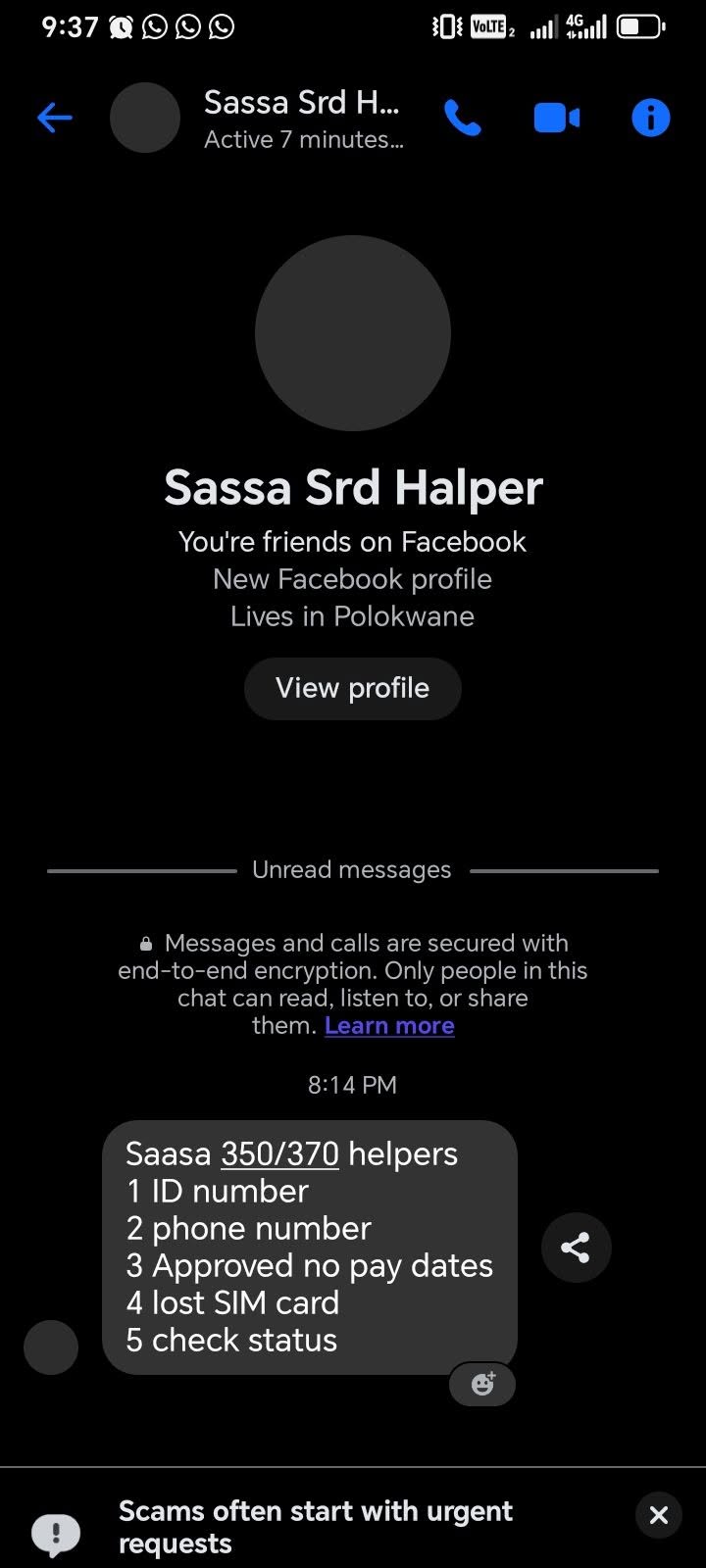
Below are the specific Facebook-side patterns to treat as an automatic red flag:
- A post claiming a new grant amount (R700, R1,500, R2,000) has been approved for SRD recipients. Every real SASSA amount change is announced via a Ministerial media release, published at sassa.gov.za and covered by mainstream news.
- A post about "uncollected" or "unclaimed" SRD funds you can release by clicking a link. SASSA does not release uncollected funds through third-party pages, ever.
- Group names that mimic SASSA branding (SASSA Updates SA, SASSA R370 Help) but are not verified with the blue tick.
- Comment threads where every reply is a variation of the same short sentence pushing the link.
- Any link asking you to enter your ID plus a bank PIN, OTP, or card number. The real SASSA SRD status check needs only an ID and cellphone number.
SASSA Never Announces Grant Changes on Facebook First
Every legitimate change to the R370 SRD grant, from payment date shifts to new amounts, is announced through a formal media statement on sassa.gov.za and covered by mainstream news outlets on the same day. If you see it on a Facebook group before the news breaks, treat it as fake by default and verify with SASSA directly on 0800 60 10 11.
Red Flag 3: Upfront Fees to "Process" or "Unlock"
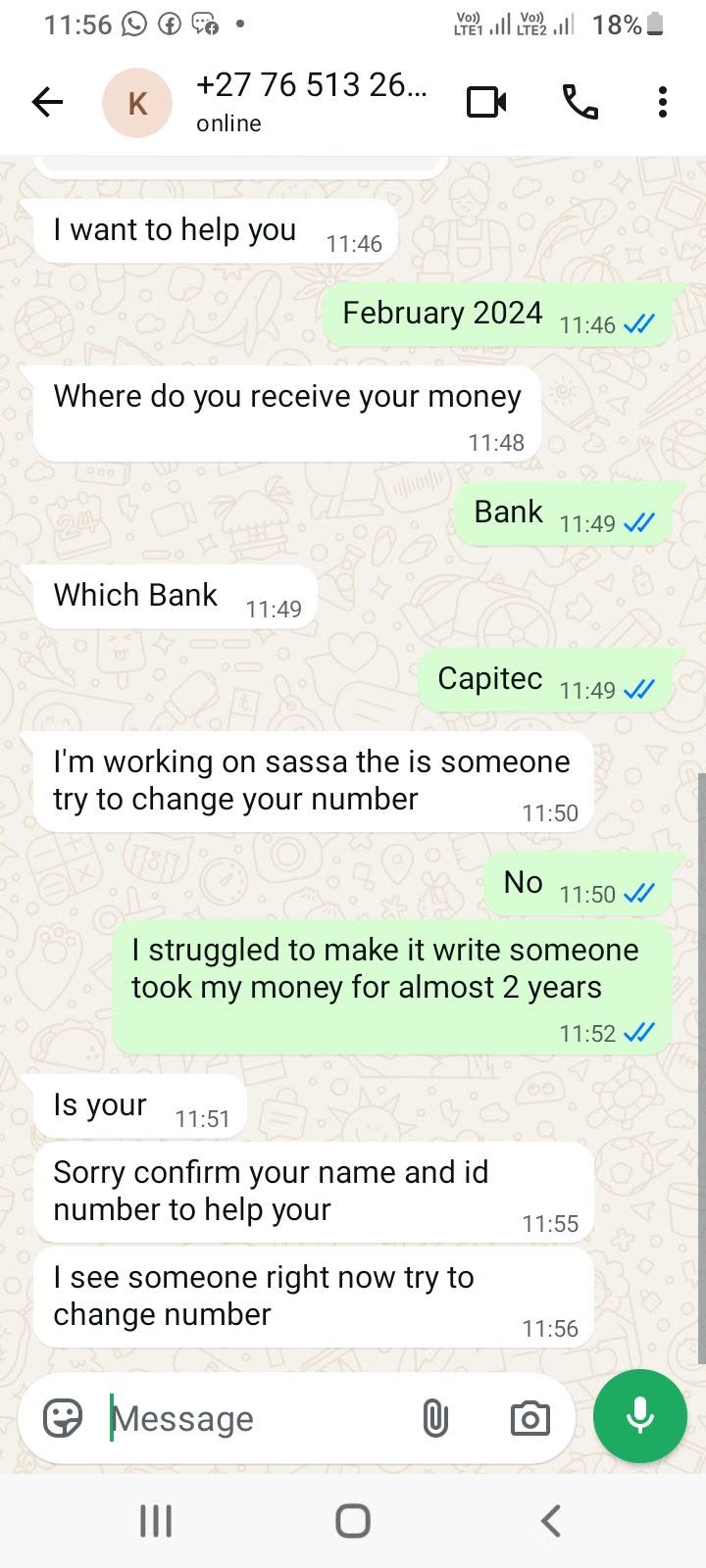
The SASSA R370 SRD grant application, the SASSA status check, the reconsideration appeal, and every other official SRD service are completely free. NSFAS bursary applications are also free. SARS eFiling is free. Any person, group, WhatsApp number, agency or Facebook page asking for a fee to apply, check status, appeal, or "unlock" a grant is committing fraud under section 21 of the Social Assistance Act.
The Facebook scam variant of this red flag comes in three shapes. First is a small "admin fee" of R25 to R50, framed as a payment for "portal processing" or "SIM verification." Once you pay, the scammer both keeps the money and now has your bank card details to run further transactions. Second is a larger "unlock fee" of R200 to R500 that supposedly releases a Declined status or backdated payment. This is always fake; only SASSA can reverse a Declined decision through a formal reconsideration, which is free to lodge. Third is the "SRD fixer" service, where a WhatsApp contact or Facebook Marketplace listing offers to appeal or reapply on your behalf for a percentage of the grant. SASSA does not accept third-party appeals for the SRD grant. Every submission is fraudulent.
SASSA has posted repeated public warnings that no fee is ever charged for any SRD service. NSFAS has issued the same warning about paid application services. If you have already paid, you cannot recover the money from the scammer, but you can and should report the incident so that the account is flagged.
The Zero-Fee Rule
SASSA never charges to apply, check status, appeal, update banking details, verify your identity, or "reactivate" your SRD profile. If any person or page asks for money in exchange for any of these, they are running a scam. Full stop.
Red Flag 4: The "Approve the Popup" Phone-Call Scam
The newest variant, spreading fast through September 2026, is not a link at all. It is a phone call. A stranger calls, sounds friendly, and says something like this:
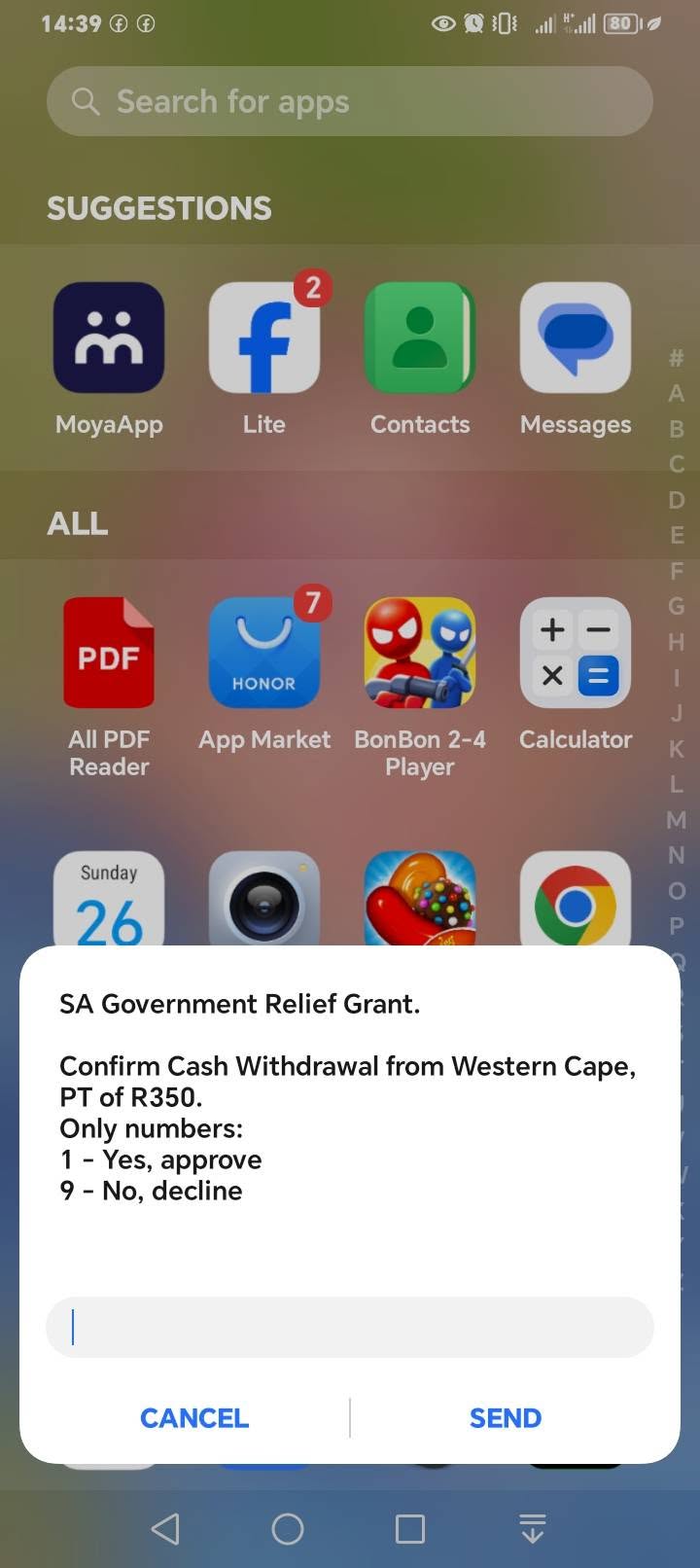
"Sorry, you've accidentally registered your phone number for their SRD grant. A popup message is coming to your number now. Please click yes or approve so they can receive their money."
The moment you tap approve on that popup, the scammer links your SIM, your banking app, or your SASSA profile to their device. Within minutes they empty every account tied to that number. The scam is being run in batches of calls from different numbers reading from the same script, which is how victims tell they are being targeted rather than helped.
The safe move is not to press yes and not to press decline either. Both buttons on some banking-app popups can trigger the confirmation. Cancel the popup by closing the notification, locking the phone, or force-closing your banking app. Then call your bank's fraud line to confirm no unauthorised link was made.
The Popup Rule
SASSA does not send popup approval messages to your phone to "release someone else's grant." If a caller asks you to approve a popup for any reason, hang up and cancel the popup without pressing either button. Then call your bank's fraud line. Report the calling number to [email protected].
How to Run a Safe R370 SRD Status Check
The safest way to check your SRD status is to reach the SASSA database through a channel you initiated yourself, not one you clicked from a social feed. In practice this means typing the address into your browser, or using a channel that is impossible to spoof, like USSD.
1. Type the URL yourself. Open your browser and type srd.sassa.gov.za directly into the address bar. Do not click links from Facebook, WhatsApp, SMS or email, even from friends. If the link was forwarded to you, the sender may not know it is malicious.
2. Use USSD when in doubt. Dial *134*7737# from your SASSA-registered cellphone. USSD runs on the mobile network directly, not through the internet, so it cannot be spoofed by a fake Facebook link. It works even during load shedding and portal outages.
3. WhatsApp only on 082 601 0111. Save the number as a contact first, then message status plus your ID. Since the September 2026 anti-scam update, the SASSA SRD bot only replies to saved contacts. Any other WhatsApp number claiming to be SASSA SRD is fraudulent.
4. Call the toll-free line for verification. If a Facebook post claims something suspicious, call 0800 60 10 11 to confirm before acting. An agent will check the SOCPEN system for you and tell you if the claim is genuine.
If You Already Clicked or Paid
If you shared your ID number and cellphone with a scam page, the attackers have enough to try to change your bank details on the real SRD portal and redirect your R370 to their account. Log in to srd.sassa.gov.za immediately, confirm the bank details on file are still yours, and change your SRD portal password if the site prompts you. If you also shared bank PINs or card numbers, contact your bank's fraud line at once and freeze the affected card. Change your online banking password from a device that has not visited the scam page.
If you paid a fee, keep the payment reference, the WhatsApp chat, the Facebook post URL and every screenshot of the exchange. Report the scam to SASSA, to the platform where you saw it, and to the South African Police Service so a case number is opened. The chances of recovering the money are low, but the report is what lets SASSA and Facebook take the fake group or account down before more people fall for it.
How to Report an SRD Scam
- SASSA SRD email: [email protected] (include screenshots and the fake URL or WhatsApp number)
- SASSA toll-free: 0800 60 10 11 (Mon to Fri, 07:30 to 17:00)
- Report a Facebook post/group: tap the three dots on the post » Report post » Scam or fraud
- SAPS cybercrime: 08600 10111 or visit your nearest police station
- SABRIC (banking fraud): 011 847 3000
The Facebook SASSA SRD scam wave is not going away because it works. Attackers only need a small percentage of the millions of R370 recipients to click through for the operation to be profitable. The single most effective defence is a habit change: never reach the SRD portal by clicking a link on a social feed, always type the address yourself, and always confirm any surprising claim with SASSA directly. Share this article with the recipients you know, especially first-time SRD applicants who are the biggest target group.